

The Ascii Agent Server allows you to run AI agents on your own cloud VMs or local machines. The agent server comes with a CLI that makes installation and management straightforward.Documentation Index
Fetch the complete documentation index at: https://docs.ariana.dev/llms.txt
Use this file to discover all available pages before exploring further.
Your machine must be publicly accessible and reachable over the internet.
Quick Install (Recommended)
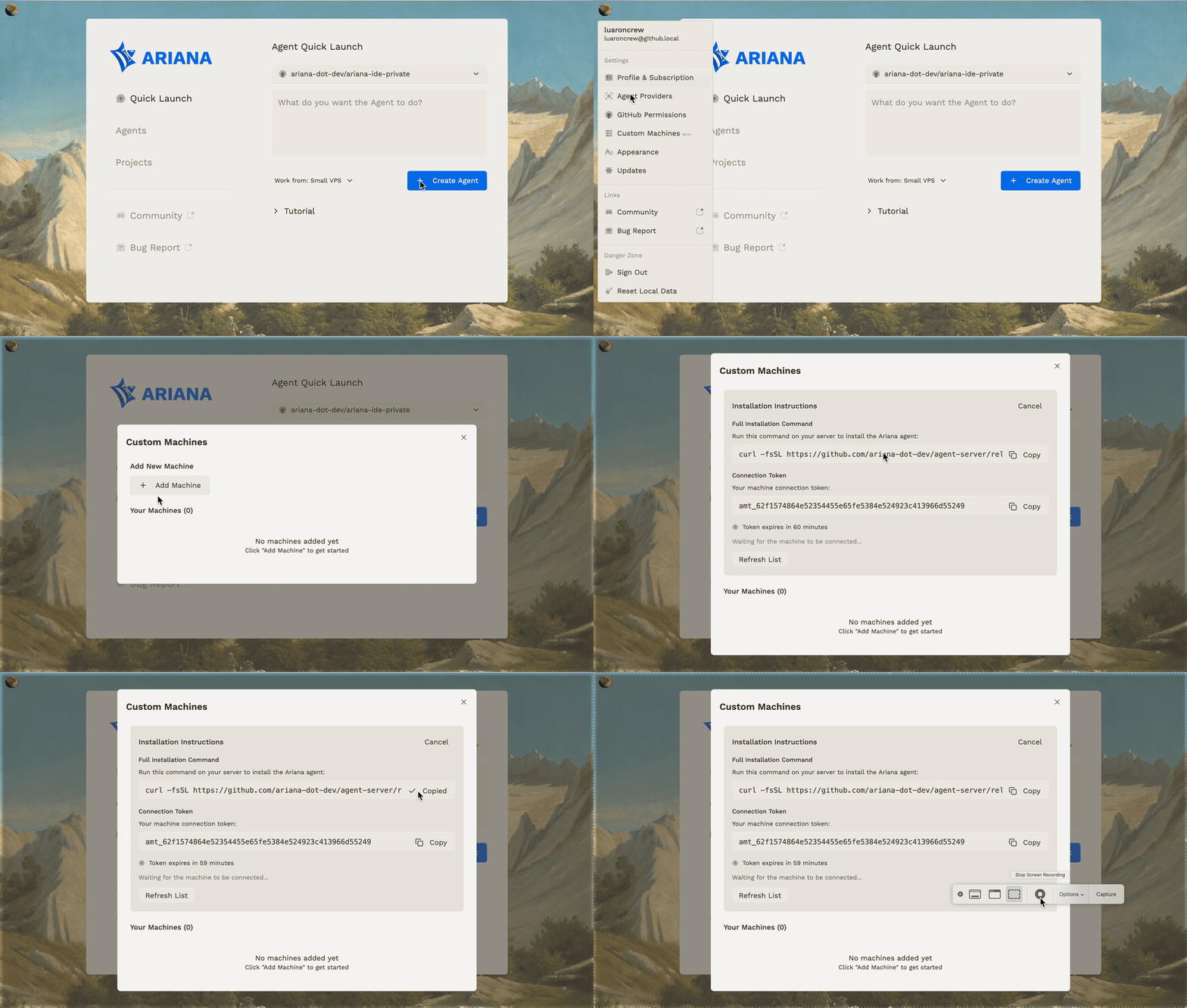
The easiest way to install the agent server is through the Ascii app:- Open the Ascii app
- Click the top-left menu
- Go to Custom Machines
- Click Add
Install and Connect via CLI
Alternatively, you can install the CLI manually. The Ascii Agent Server is managed through the Ascii CLI. Install the CLI first:- Detects your platform (Linux/macOS) and architecture (x64/ARM64)
- Downloads the appropriate CLI binary from GitHub releases
- Installs it to
/usr/local/bin/one - Makes it executable and verifies the installation
one command for managing your agent server.
Post-Installation
Connect to Ascii
After installing the CLI, connect your machine to your Ascii account using a registration token:- Register your machine with Ascii
- Install the agent server
- Install required dependencies (Git, GitHub CLI, Node.js, Claude Code CLI)
- Start the agent server automatically